
In cases where dozens or hundreds of sample locations need to be updated at the same time (e.g., in the case of exported samples), it is possible to update locations in bulk in the back end of the database. Follow the protocol below to create an MS Excel document that is ready for use by a database specialist to implement the update.
Note: Before preparing a bulk update, be in touch with the Registrar about whether this is an appropriate situation for a bulk update, and to keep them informed about when the Excel document is ready.
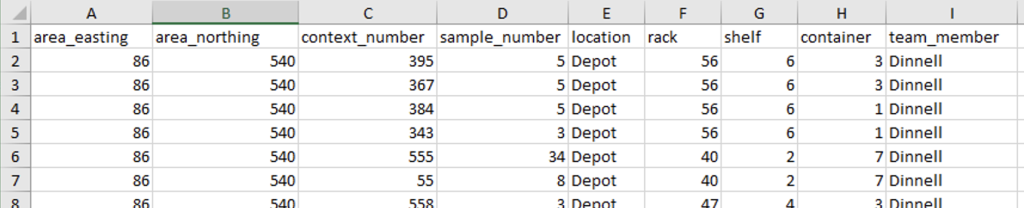
The screenshot below shows the columns that should be present in the Excel (in this order, and with this formatting); note that it is ok for the rack, shelf, and container columns to be empty. The team_member column should contain your name as it appears elsewhere in the database. The value of the location column should also be as it appears elsewhere in the database.
Once you have added all of the samples to be updated, it is strongly recommended that you check for duplicates. To do this, create a blank column after the sample_number column, and use the CONCATENATE formula in Excel to generate the full sample key. The formula should read something like =CONCAT(A1,”.”,B1,”.”,C2,”.”,D2), which will produce an output that looks like “97.541.620.15”; different versions of Excel might use slightly different formats for the formula. Next, select the column containing concatenated values and select the Conditional Formatting tool. Select Highlight Cell Rules > Duplicate Values and accept the defaults. This will highlight all duplicate sample keys in the Excel document. There should be no duplicates in the bulk upload, so these should be corrected; if there are no duplicates, you are ready to proceed.
You will save this file in gygaia\project_areas\storage_and_registration\bulk_updates and name it “bulk_location_update_[suffix]”; the suffix should be something descriptive like the date or “conservation.” Make sure that you notify the registrar that there is a bulk update waiting and what the file name is. The bulk update will then be implemented by a database specialist, and you will be notified when it is complete.